Running tests
info
Before you start.
- Permissions: Run Test; View Run to see results; Cancel Run to cancel (Permissions).
- The collection must be published. A draft cannot be run as a collection, and a single case runs from a published version that contains it. Publish first: see the Cases tab.
- An environment must exist, and every secret the cases use must exist (otherwise the case ends with
SECRET_MISSING). - New to API Test? Follow the Quick start first.
Running a collection
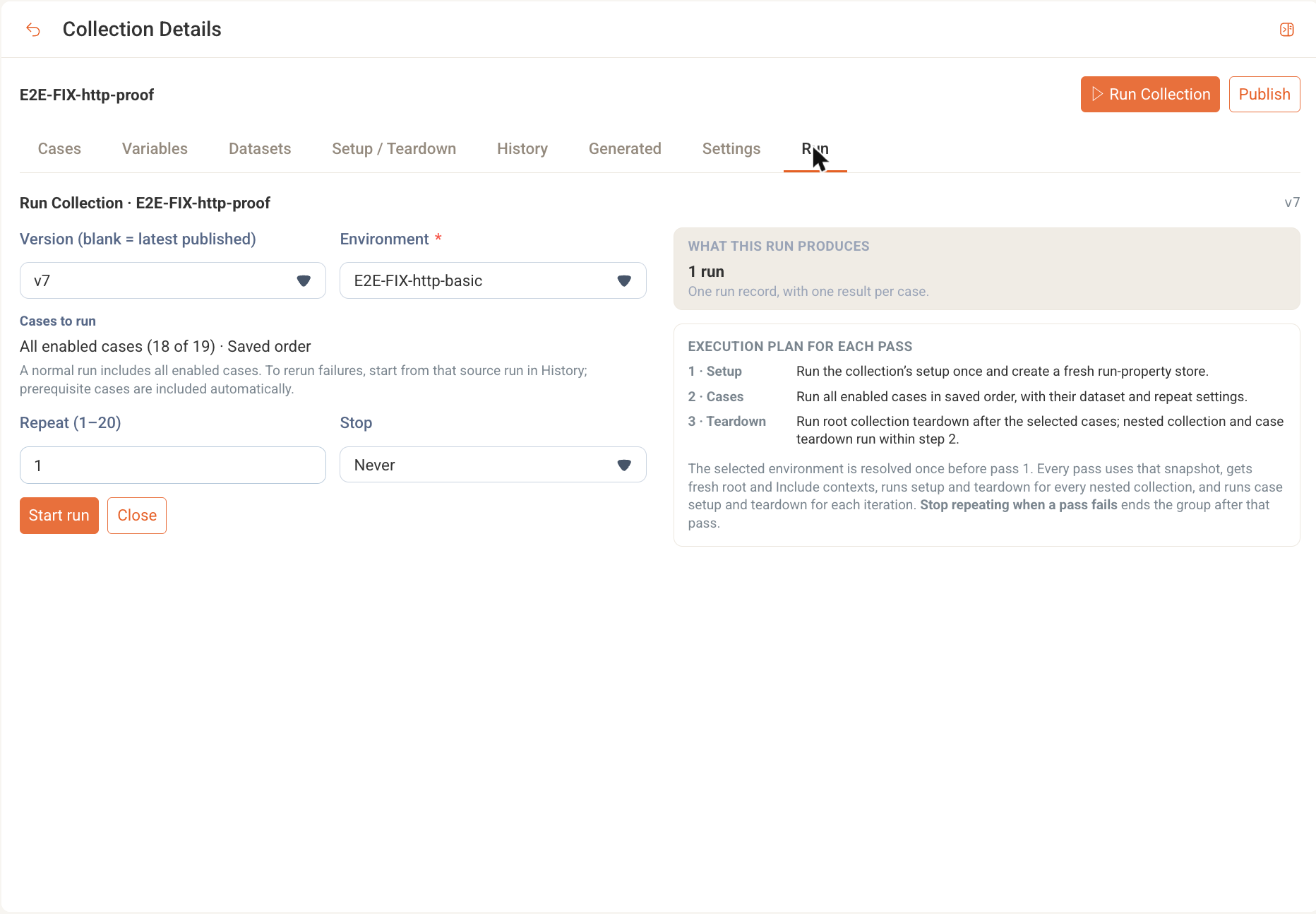
Run Collection: Version, Environment, Cases to run ("All enabled cases (18 of 19) · Saved order"), Repeat (1–20), Stop, Start run / Close, "What this run produces", "Execution plan for each pass".
Panel title: "Run Collection · name".
| Element | Source / options | Function & result |
|---|---|---|
| Version (blank = latest published) | List of Published versions | The collection version to run. Blank = latest published version. |
| Environment (· REST / SOAP) | "Collection default" or a non-MQ environment | Run target. Resolved once before pass 1 and used by all passes. |
| Environment · MQ | Only shown when there are MQ cases | MQ environment for the run. |
| Overrides (optional) → Variable / Value | Env vars and run vars without a writer; placeholder shows the current value | Replaces values for this run only. Secrets cannot be overridden. |
| Cases to run | Automatic (text) | Example: "All enabled cases (n of m) · Saved order": all enabled cases in saved order. A normal run has no case picker; to re-run failures, start from History. |
| Repeat (1–20) | Number | Runs the whole collection several times (each pass with a fresh context). |
| Stop | Never / On first failed pass | Stops repeating after the first failed pass. |
| "What this run produces / Execution plan" panel | Automatic | Explains the order: 1 Setup (once, fresh store) → 2 Cases (in order, per dataset & repeat) → 3 Teardown (after the selected cases). |
| Start run | Needs the run permission | Starts the run (the button is called Start run, not "Run"). The result appears in History ("Run #n: status · outcome"). |
| Close | — | Goes back to the tab before Run. |
Running a single case
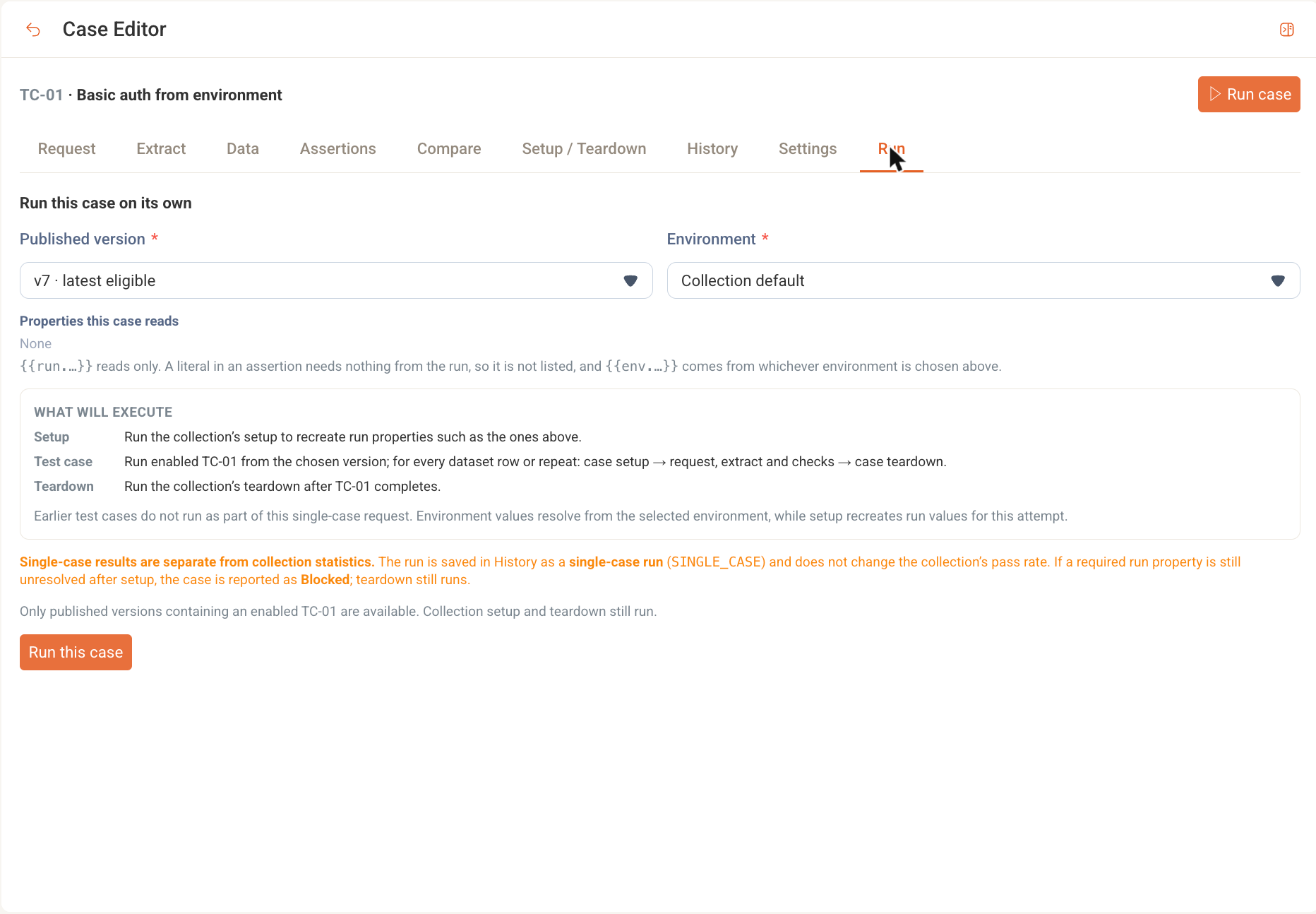
Run this case on its own: Published version ("v7 · latest eligible"), Environment, Properties this case reads, WHAT WILL EXECUTE, single-case run note, Run this case button at the bottom.
Panel title: "Run this case on its own". The Run case button in the editor header opens this tab.
| Element | Source / options | Function & result |
|---|---|---|
| Published version (required) | Published versions containing the case in an enabled state; the newest is marked "· latest eligible" | The version that runs. None → "Publish the case before running it". |
| Environment (required) | "Collection default" or an environment matching the case protocol | Run target. |
| Optional run overrides → Variable / Value / + Add override | Env vars & run vars without a writer | Replaces values for this run only. |
| "unsaved draft edits" warning | Automatic | The run uses the last published version, not your draft edits. |
| Properties this case reads / What will execute | Automatic | Collection setup → case (setup → request, extract, checks → teardown) → collection teardown. Earlier cases do not run; a property still unresolved after setup makes the case Blocked (teardown still runs). |
| Run this case (button at the panel bottom) | — | Runs it (the button is called "Run this case"; the editor header also has "Run case", which opens this tab). The result is stored in History as a single-case run (SINGLE_CASE) and does not change the collection's pass rate. |
Cancelling and rerunning
| Situation | What happens |
|---|---|
| Where to cancel | Cancel run is on the run results page while the run is Queued or Running. Download report stays disabled until the run has finished. Needs the Cancel Run permission. |
| A case is already executing | That case finishes and keeps its real result and duration. The run then ends CANCELLED. |
| Cases that have not started | They are not run. They show as Skipped with the reason RUN_CANCELLED and 0 ms. |
| Counts and pass rate | Skipped cases are left out. For example 2 passed, 1 failed, 0 blocked and 1 skipped gives "Pass rate: 66.7% (2 of 3 attempted)". |
| A queued run | For example one pass of a Repeat run that has not started. It is cancelled at once, shows no case results, and the other passes are not affected. |
| Teardown | Teardown still runs after a cancel. The results page lists it under "Teardown steps (always run)". |
| Cancelling too late | If the run has already finished, the request is refused (HTTP 409). The page shows the finished run as normal and no message appears. Short runs can finish before you click Cancel run. |
| After a cancelled run | Rerun failed only is offered. It re-runs the failed cases as a new run with the trigger "Rerun failed" (see Results, history and reports). |
