Email Server
The Email Server configures which outgoing (smtp) mail server and mailbox when the platform needs to send email.
To open it, go to Admin Center and then open Email Server from the sidebar under System in Agis Configuration.
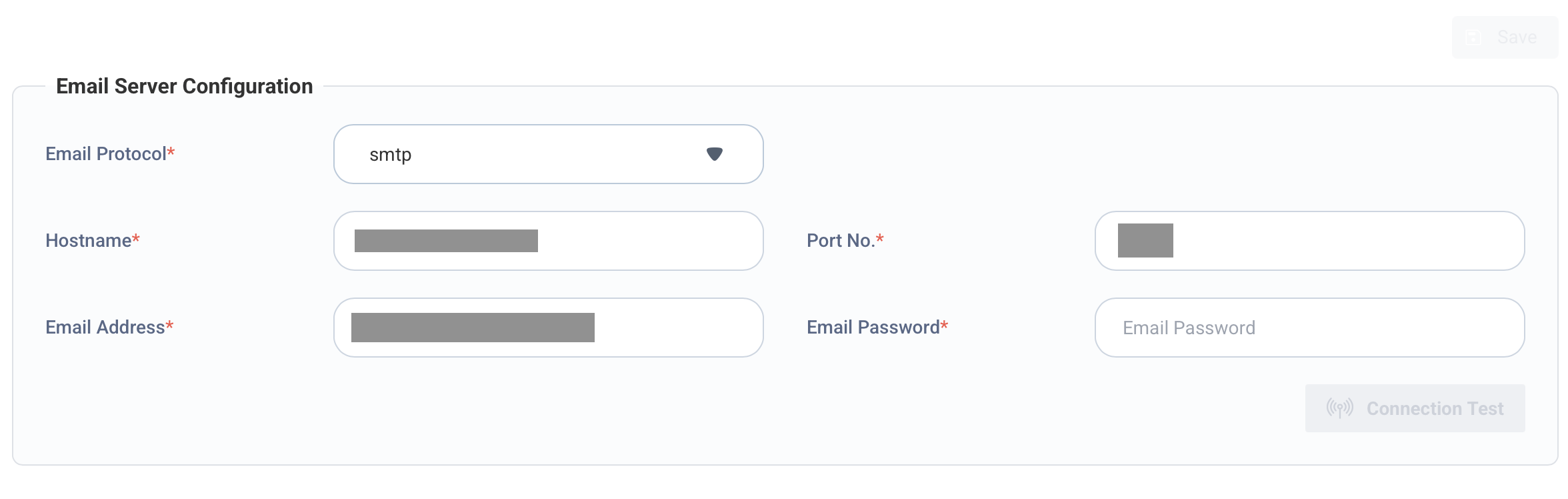
Fields
| Field | Required | Description |
|---|---|---|
| Email Protocol | Yes | The mail protocol. Only SMTP is available. |
| Hostname | Yes | The address of the outgoing mail server. |
| Port No. | Yes | The port on that server, for example 8080. |
| Email Address | Yes | The mailbox AGIS sends from. It must be a valid email address. |
| Email Password | Yes | The password for that mailbox. |
Configure the email server
- Open Email Server. Any existing configuration is loaded automatically.
- Fill in or update the fields.
- Click Connection Test. The result appears next to the button
Connecting..., thenSuccessfulorFailed. - When the test shows
Successful, clickSave. - A Configuration Saved message confirms the change.
Save stays disabled until the connection test succeeds and every field is valid.
