Airflow
The Airflow is a scheduling service used to run Data Retrieval (ETF) jobs.
To open it, go to Admin Center and then open Airflow from the sidebar under System in Agis Configuration.
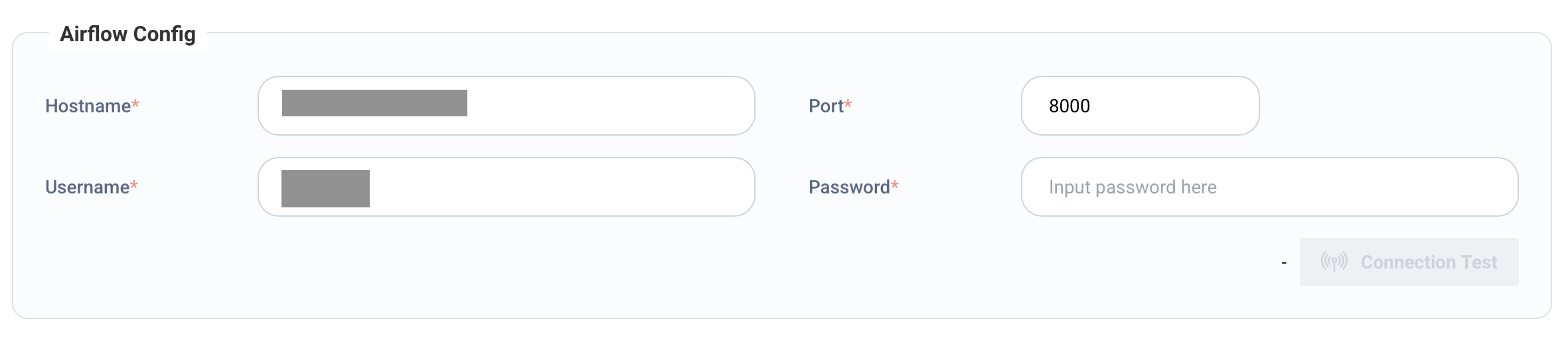
Fields
| Field | Required | Description |
|---|---|---|
| Hostname | Yes | The address of the Airflow server. |
| Port | Yes | The port of the Airflow server. |
| Username | Yes | The Airflow account AGIS signs in with. |
| Password | Yes | The password for that account. |
Configure the Airflow
- Open Airflow. Any existing
hostname,portandusernameare filled in. - Fill in or update the fields.
- Click Connection Test. The result appears next to the button
Connecting..., thenSuccessfulorFailed. - When the test shows
Successful, clickSave. - A Configuration Saved message confirms the change.
Save stays disabled until the connection test succeeds and every field is valid.
tip
If you delete a character in the Password field, the whole field is cleared. Type the full password again.
